Libera Suite 0.7: PDFs, passwords and signatures
10 November 2026
Libera Suite 0.7 is out. You can now comment on, fill in and rearrange PDFs, open and save documents protected by a password, and read and make digital signatures.
Libera Suite is a free and open-source office suite for Windows, macOS and Linux: Libera Words for text, Libera Tables for spreadsheets, Libera Slides for presentations, Libera PDF for PDFs, and Libera Diagrams, a viewer for Visio drawings. It opens and saves the formats of Microsoft Office and LibreOffice, on your own computer, with no account or cloud service.
Already using it? Quit Libera Suite if it's running, then run the installer or the install command again, or brew upgrade libera if you are using Homebrew. With pip, pipx or Homebrew, the components now install with the application, about 100 MB, so nothing is downloaded when it first starts. The start window offers once to delete what earlier versions downloaded, and libera --payload-remove does it at any time.
PDFs
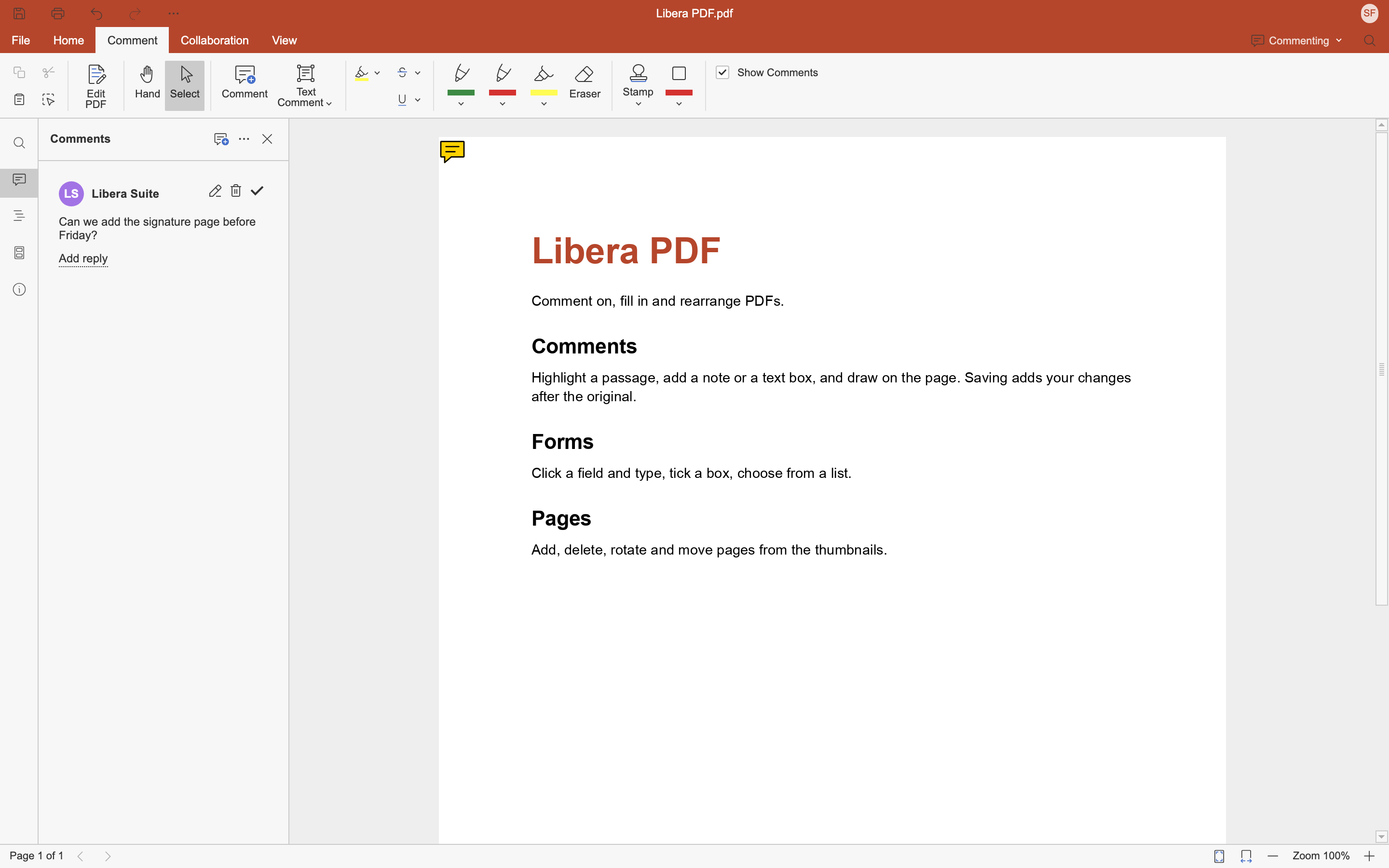
A PDF opens in Libera PDF. You can add comments, highlights, drawings and text boxes, make small corrections to the text, and add, delete, rotate and move pages. You can also fill in forms: a French Cerfa and the US IRS forms are among those we tried.
Saving adds your changes after the original, which stays in the file as it was. This means a page you delete or text you correct can still be recovered from the saved file, so don't rely on either to remove something confidential from a PDF you send.
Edited text does not reflow. A certified PDF cannot be saved, even one whose certification permits comments: the save fails, and the file is left as it was. You can't create a form or convert a PDF into a document yet. Libera Suite is offered in Open With for a PDF, never as the default. Work with documents has the detail.
Passwords
A Word, Excel, PowerPoint, OpenDocument or PDF file protected by a password asks for it as it opens, and saving keeps it protected. File ▸ Protect adds, changes and removes a document's password. A save to a format that cannot keep a password (text, CSV, RTF, HTML, Markdown, EPUB) asks first. A protected document that has been tampered with is refused, with a fix from ElixirOffice.
By default, LibreOffice 26 encrypts OpenDocument files in a way Libera Suite cannot read yet, and Libera Suite says so instead of asking for the password. While a protected document is open, its working copy on your disk is not encrypted, so that a crash doesn't lose your changes. Work with documents has the detail.
Digital signatures
A signed Word, Excel or PowerPoint document shows its signatures as it opens, each valid or not, and opens read-only. Protection ▸ Signature signs one with a key file (PKCS#12 or PEM) and its passphrase, and you can remove signatures. We checked signatures made in Libera Suite with Microsoft Office and LibreOffice, and signatures made by both in Libera Suite.
Valid means the document has not changed since it was signed: who issued the certificate, and whether it has expired, are not checked yet. Signing a protected document, an OpenDocument file or a PDF is not possible yet. Work with documents has the detail.
Other changes
- Word 97-2003 documents open. No
.docfile had ever opened. Web archives (.mht), FictionBook (.fb2) and EPUB books now open too. - The converter starts in about half the time, so every open and save is a little quicker.
- Dropping a file on a window works on Linux: a document opens in a window of its own, and a picture goes into the document. The Flatpak can now also open files on USB sticks and mounted drives.
- A document someone else has open now says so, whichever window it opens in. Every window was told the state of the first.
- On Windows, a window no longer opens larger than the screen.
Security
Earlier versions have all of these problems, so please update.
- A document can no longer copy pictures from your disk into itself. A picture linked to a path on your disk was copied into every document saved or converted from it, so sending the document back sent the picture too. A linked picture is now read from a web address only.
- Three cross-site scripting (XSS) holes are closed. A crafted document could run a script in the editor when you selected a tracked change, opened the Formula Wizard or clicked a
javascript:link. All three are now shown as text or refused. The editor's page also loads pictures from Libera Suite only, so a script can no longer send anything out in a picture's address. - The converter no longer writes pieces of its own memory into the files it makes.
- A small document can no longer take the converter to gigabytes of memory.
Signed downloads, and the source
The Flatpak bundles are signed with our OpenPGP key, and Other ways to install says how to check one. The Windows installer and Libera.app are not signed yet. Install has the way past the warning about the installer; the one-line PowerShell install, pip, pipx and Homebrew never meet a warning.
The source of the converter's wheels is the libera-core source package on PyPI: the upstream commits it pins, our patches and the build scripts. The application's source is tag 0.7.0 of abilian/libera-suite.
Unchanged
- Linux on arm64 still installs 0.4.1: there is no arm64 build of 0.7 yet.
What works today lists what is built, what is half-built and what is not started yet, and the roadmap says what comes next.
Tell us
Libera Suite is young: every report counts. The most useful one is a document that comes out wrong, attached to your message with the output of libera --diagnose. Feedback says how to reach us.
Abilian