Architecture
A document opens through three things: a window the operating system provides, an HTTP server the application runs on loopback, and a converter it shells out to.
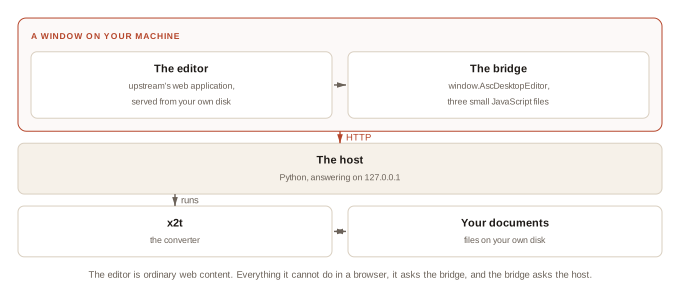
The pieces
libera FILE
      │
      │   host/, innermost first -- nothing imports anything above it
      │
      ├── session.py    who is editing what, bound per request
      ├── hooks.py      callbacks the window layer installs
      ├── desktop.py    reveal a file, open a URL, whose account this is
      ├── convert.py    x2t: documents in, documents out
      ├── recents.py    the Recent list
      ├── opening.py    opening a document into a session
      ├── server.py     HTTP: routing, endpoints, the injected bridge
      ├── window.py     windows, dialogs, the close prompt
      ├── menu.py       the macOS menu bar
      │
      └── bridge-runtime.js  ┐ window.AscDesktopEditor and the shims around
          bridge-page.js     │ it, injected into every page before the
          bridge-desktop.js  ┘ editor's own scripts run
The editor is ordinary web content. It is served over loopback to a WebKit window on your own machine, with one script injected ahead of it.
The contract
The editor talks to its host through a single JavaScript object, window.AscDesktopEditor. That object is the contract: everything the editor cannot do in a browser, it asks for there.
Libera Suite implements the object in JavaScript, backed by a Python server over HTTP, so the host is a few thousand lines.
The offline editor itself is already in upstream's source, and we answer it unmodified: three files, about 1,200 lines, selected at build time by SDK_PLATFORM=desktop.
How a document moves

x2t converts the document into Editor.bin. The editor opens that and streams its edits as a change log. Saving merges the two back through x2t into a real document, in the format you opened.
Two things follow. Closing a window can save without asking the editor anything, because the host already holds everything it needs. A crash leaves a working copy and a log on disk, which is what crash recovery offers you back.
What the host does
| the editor asks | the host does |
|---|---|
| open this document | runs x2t to convert it into the editor's working format |
| here are my changes | appends them to a change log |
| save | runs x2t to merge the working format and the change log back into a document |
| the same, to PDF, then hands the file to the desktop | |
| open / save-as dialog | puts a real native dialog on screen |
| new document | copies a blank from the payload |
| open an external link | hands the URL to your browser |
Every one of these is a small HTTP endpoint. The conversions run in upstream's x2t binary, the same one upstream uses.
x2t and doctrenderer
x2t is the converter. For most formats it is C++ all the way down. For PDF it is not: doctrenderer embeds V8 and runs the editor's own JavaScript layout engine server-side, so the PDF you print is laid out by the same code that drew the screen.
The PDF path needs the real font files and a font index with absolute paths to them. The obfuscated copies the browser downloads will not do. Get that wrong and it fails inside V8 with a JavaScript type error; get it half-wrong and it segfaults.
The payload
The application and the payload are separate artifacts on separate version numbers.
| the Python package | a few hundred KB, on PyPI |
core-<platform>.tar.gz |
58 MB: x2t and the native libraries |
editors.tar.gz |
sdkjs and web-apps: all four editors, the blanks and the dictionaries |
fonts-core.tar.gz |
4 MB: font sources (the browser's copies are generated from these) |
Two things force that split. Generated files hold absolute paths, so they must be produced on the target machine. doctrenderer reads real .ttf files, so we ship font sources and generate the browser's copies locally at install time.
Design notes
Branding is build-time configuration. The product name, the logos and the application name written into saved documents are all upstream configuration points.
Our changes to upstream are a patch queue. See The patch queue.
One observation is not a diagnosis. The regression harness exists because of a string of confident wrong answers about why the editor would not load. Each was consistent with the evidence and each was wrong.